Debian 11: Enable remote access MariaDB

Debian 11:  Enable remote access MariaDB
  Configure MariaDB By default, MariaDB allows connection only from localhost,  sudo nano /etc/mysql/mariadb.conf.d/50-server.cnf Change the...

 Configure MariaDB

By default, MariaDB allows connection only from localhost, 

sudo nano /etc/mysql/mariadb.conf.d/50-server.cnf

Change the value of the bind-address from 127.0.0.1 to 0.0.0.0 so that MariaDB server accepts connections on all host IPv4 interfaces.


Restart MariaDB Server

sudo systemctl restart mariadb

(gungsan)

Ubuntu 22.04 : Mengganti Port Default Apache2

Ubuntu 22.04 : Mengganti Port Default Apache2
Login sebagai root pada sistem menggunakan perintah berikut dan masukan password root  sudo nano /etc/apache2/ports.conf Kemudian restart se...


Login sebagai root pada sistem menggunakan perintah berikut dan masukan password root 

sudo nano /etc/apache2/ports.conf

Kemudian restart services Apache dengan perintah berikut 

sudo systemctl restart apache2    

Selesai ๐Ÿ˜
(gungsan)

Ubuntu Budgie 22.04 LTS (Jammy Jellyfish) released

Ubuntu Budgie 22.04 LTS (Jammy Jellyfish) released
Ubuntu Budgie 22.04 LTS (Jammy Jellyfish) is a Long Term Support release with 3 years of support, from April 2022 to April 2025. Ubuntu LTS ...


Ubuntu Budgie 22.04 LTS (Jammy Jellyfish) is a Long Term Support release with 3 years of support, from April 2022 to April 2025. Ubuntu LTS releases are focused on long term support, therefore stability is more important than having latest and greatest version of kernel, desktop environment, and applications.


Download Here......  Ubuntu Budgie 22.04 LTS


Download


Source : https://ubuntubudgie.org/2022/03/ubuntu-budgie-22-04-lts-release-notes/

(gungsan)

Ubuntu MATE 22.04 LTS (Jammy Jellyfish) released

Ubuntu MATE 22.04 LTS (Jammy Jellyfish) released
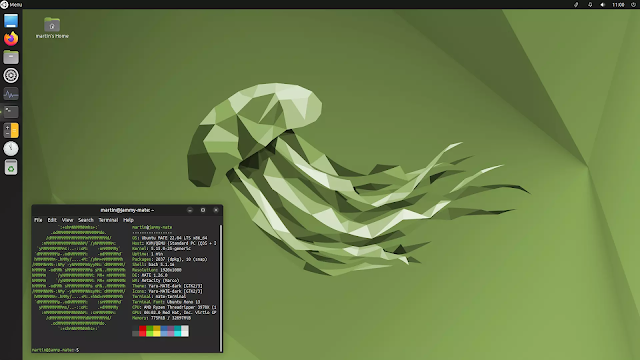
  Ubuntu MATE 22.04 LTS (Jammy Jellyfish) released What’s changed? Here are the highlights of what’s changed recently. MATE Desktop 1.26.1 ...


Ubuntu MATE 22.04 LTS (Jammy Jellyfish) released


What’s changed?


Here are the highlights of what’s changed recently.


MATE Desktop 1.26.1 ๐Ÿง‰

Ubuntu MATE 22.04 features MATE Desktop 1.26.1. MATE Desktop 1.26.0 was introduced in 21.10 and benefits from significant effort ๐Ÿ˜… in fixing bugs ๐Ÿ› in MATE Desktop, optimising performance ⚡ and plugging memory leaks. MATE Desktop 1.26.1 addresses the bugs we discovered following the initial 1.26.0 release. Our community also fixed some bugs in Plank and Brisk Menu ๐Ÿ‘ and also fixed the screen reader during installs for visually impaired users ๐Ÿฅฐ In all over 500 bugs have been addressed in this release ๐Ÿฉน


Yaru ๐ŸŽจ

Ubuntu MATE 21.04 was the first release to ship with a MATE variant of the Yaru theme. A year later and we’ve been working hard with members of the Yaru and Ubuntu Desktop teams to bring full MATE compatibility to upstream Yaru, including all the accent colour varieties. All reported bugs ๐Ÿž in the Yaru implementation for MATE have also been fixed ๐Ÿ› 

Ubuntu MATE 22.04 LTS ships with all the Yaru themes, including our own “chelsea cucumber” version ๐Ÿฅ’ The legacy Ambiant/Radiant themes are no longer installed by default and neither are the stock MATE Desktop themes. We’ve added an automatic settings migration to transition users who upgrade to an appropriate Yaru MATE theme.


Cherries on top ๐Ÿ’

In collaboration with Paul Kepinski ๐Ÿ‡ซ๐Ÿ‡ท (Yaru team) and Marco Trevisan ๐Ÿ‡ฎ๐Ÿ‡น (Ubuntu Desktop team) we’ve added dark/light panels and panel icons to Yaru for MATE Desktop and Unity. I’ve added a collection of new dark/light panel icons to Yaru for popular apps with indicators such as Steam, Dropbox, uLauncher, RedShift, Transmission, Variety, etc.


Download Here......  Ubuntu MATE 22.04 LTS


Download


Source : https://ubuntu-mate.org/blog/ubuntu-mate-jammy-jellyfish-release-notes/

(gungsan)

Lubuntu 22.04 LTS (Jammy Jellyfish) released

Lubuntu 22.04 LTS (Jammy Jellyfish) released
Lubuntu 22.04 LTS has been released. With the codename Jammy Jellyfish, Lubuntu 22.04 is the 22nd release of Lubuntu, the eighth release of ...


Lubuntu 22.04 LTS has been released. With the codename Jammy Jellyfish, Lubuntu 22.04 is the 22nd release of Lubuntu, the eighth release of Lubuntu with LXQt as the default desktop environment.

Support lifespan

Lubuntu 22.04 LTS will be supported for 3 years until April 2025. Our main focus will be on this and future releases.

Lubuntu 21.10 remains supported until July 2022 and Lubuntu 20.04 LTS will be supported until April 2023. For 21.10 and 20.04 LTS, we are limiting changes to critical fixes and underlying system changes shipped with all other Ubuntu flavors.

What is Lubuntu?

Lubuntu is an official Ubuntu flavor which uses the Lightweight Qt Desktop Environment (LXQt). The project’s goal is to provide a lightweight yet functional Linux distribution based on a rock-solid Ubuntu base. Lubuntu provides a simple but modern and powerful graphical user interface, and comes with a wide variety of applications so you can browse, email, chat, play, and be productive.

You can find the following major applications and toolkits installed by default in this release:

  • LXQt 0.17.0 – more information here.
  • Qt 5.15.3
  • Mozilla Firefox will be shipped as a Snap package with version 98.0.2 and will receive updates throughout the support cycle of the release.
  • The LibreOffice 7.3.2 suite.
  • VLC 3.0.16, for viewing media and listening to music.
  • Featherpad 1.0.1, for notes and code editing.
  • Discover Software Center 5.24.4, for an easy, graphical way to install and update software.

Where can I download it?

You can download Lubuntu 22.04 LTS on our downloads page.


sources : https://lubuntu.me/jammy-released/
(gungsan)

Xubuntu 22.04 LTS (Jammy Jellyfish) released

Xubuntu 22.04 LTS (Jammy Jellyfish) released
Xubuntu 22.04, codenamed   Jammy Jellyfish , is a long-term support (LTS) release and will be supported for 3 years, until 2025. The Xubuntu...


Xubuntu 22.04, codenamed Jammy Jellyfish, is a long-term support (LTS) release and will be supported for 3 years, until 2025.


The Xubuntu and Xfce development teams have made great strides in usability, expanded features, and additional applications in the last two years. Users coming from 20.04 will be delighted with improvements found in Xfce 4.16 and our expanded application set. 21.10 users will appreciate the added stability that comes from the numerous maintenance releases that landed this cycle.

The final release images are available as torrents and direct downloads from xubuntu.org/download/.

As the main server might be busy in the first few days after the release, we recommend using the torrents if possible.

Xubuntu Core, our minimal ISO edition, is available to download from unit193.net/xubuntu/core/ [torrent]. Find out more about Xubuntu Core here.

We’d like to thank everybody who contributed to this release of Xubuntu!

Highlights and Known Issues

Highlights

  • Mousepad 0.5.8, our text editor, broadens its feature set with the addition of session backup and restore, plugin support, and a new gspell plugin.
  • Ristretto 0.12.2, the versatile image viewer, improves thumbnail support and features numerous performance improvements.
  • Whisker Menu Plugin 2.7.1 expands customization options with several new preferences and CSS classes for theme developers.
  • Firefox is now included as a Snap package.
  • Refreshed user documentation, available on the ISO and online.
  • Six new wallpapers from the 22.04 Community Wallpaper Contest.
(gungsan)

Kubuntu 22.04 LTS (Jammy Jellyfish) released

Kubuntu 22.04 LTS (Jammy Jellyfish) released
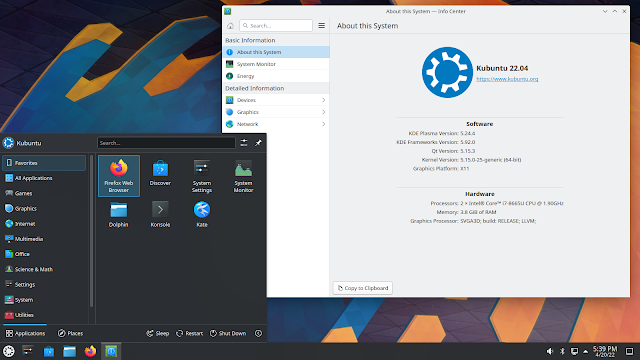
  Introduction These release notes for Kubuntu 22.04 (Jammy Jellyfish) provide an overview of the release and document the known issues. Det...


Introduction

These release notes for Kubuntu 22.04 (Jammy Jellyfish) provide an overview of the release and document the known issues.

Details of the changes in the Ubuntu base, including kernel, toolchain and build options can be found in the main Ubuntu Release Notes.

Support lifespan

Kubuntu 22.04 will be supported for 3 years.

Getting Kubuntu 22.04 LTS

Upgrading from 20.04 or 21.10

Detailed upgrade instructions can be found here: Upgrade Kubuntu to 22.04

Download a Disk Image

Download a Bootable image. Direct downloads, torrents, and zysnc are available as options.

New features and changes in 22.04

Core desktop and applications

Plasma 5.24: simple by default, powerful when needed


KDE Apps updates, including KDE Gear 21.12 and other updated apps


Web browser and office suite

Qt

Kubuntu 22.04 ships with Qt 5.15.3


Get Kubuntu 22.04 LTS Here....


https://kubuntu.org/getkubuntu/


source : https://wiki.ubuntu.com/JammyJellyfish/ReleaseNotes/Kubuntu

(gungsan)

Ubuntu 22.04 LTS (Jammy Jellyfish) released

Ubuntu 22.04 LTS (Jammy Jellyfish) released
Ubuntu 22.04 LTS, codenamed “Jammy Jellyfish”, is here. This release continues Ubuntu's proud tradition of integrating the latest and gr...


Ubuntu 22.04 LTS, codenamed “Jammy Jellyfish”, is here. This release continues Ubuntu's proud tradition of integrating the latest and greatest open source technologies into a high-quality, easy-to-use Linux distribution. The team has been hard at work through this cycle, together with the community and our partners, to introduce new features and fix bugs.


Ubuntu Desktop 22.04 LTS gains significant usability, battery and performance improvements with GNOME 42. It features GNOME power profiles and streamlined workspace transitions alongside significant optimisations which can double the desktop frame rate on Intel and Raspberry Pi graphics drivers.


Ubuntu 22.04 LTS is the first LTS release where the entire recent Raspberry Pi device portfolio is supported, from the new Raspberry Pi Zero 2W to the Raspberry Pi 4. Ubuntu 22.04 LTS adds Rust for memory-safe systems-level programming. It also moves to OpenSSL v3, with new cryptographic algorithms for elevated security.


To get Ubuntu 22.04 LTS

-------------------

In order to download Ubuntu 22.04 LTS, visit:


https://ubuntu.com/download


source :

https://lists.ubuntu.com/archives/ubuntu-announce/2022-April/000279.html

(gungsan)